

Voice agents
A voice agent is the phone side of an AI agent. The instructions, knowledge, and tools that you set in AI Agent are the same ones that the caller hears. An agent that answers in chat can answer on the phone without a new build.
This page covers the settings that apply to speech. All other settings are in AI Agent.
The AI agent editor has a Chat / Voice switch at the top. Click Voice to see the voice settings. The voice settings have 5 tabs:
The Save button at the top of the editor saves the chat settings and the voice settings together.
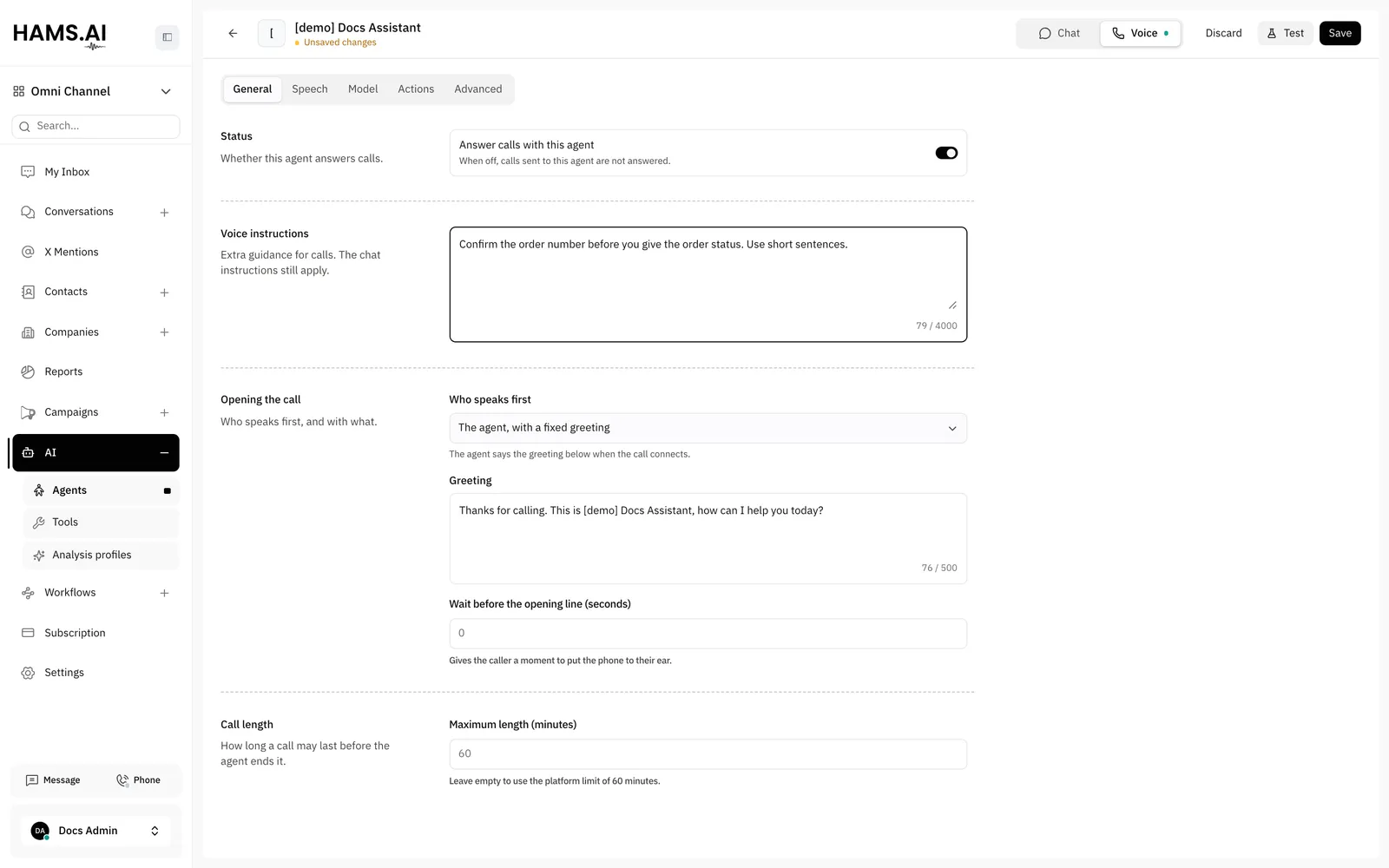
Turn on voice for an agent
Only an agent with Answer calls with this agent on can answer calls. When you point at the Voice switch, it shows Answering calls or Not answering calls.
If a setting is missing or has a conflict, the box Fix before taking calls shows above the tabs. Each item is a setting that stops the save or does not apply on calls. Fix every item before the agent answers calls. The box can show these items:
- Add a greeting.
- The wait before the opening line must be 0 to 10 seconds.
- Choose a voice.
- Enter a model for every language model.
- Every transfer needs a name and a destination.
- Every transfer needs its own name, and no built-in tool’s name.
- Remove backups that repeat a choice above them.
- The caller speaks first, so they can’t be muted until the agent finishes its opening.
The same box can also show Worth checking. These items do not stop the save, but the setting can work differently from what you expect:
Use Voice instructions for guidance that applies on calls only. The chat instructions of the agent also apply on calls. For example, “Confirm the caller’s account number before you discuss an invoice.”
A duplicated AI agent has the voice settings of the original agent, but Answer calls with this agent is off.
Put an agent on a call
Add an AI voice agent node to a call flow and pick the agent. The node hands the caller to the agent. The agent talks to the caller until the conversation ends.
Put the node after the nodes that decide who must get the call. For example, place it after a Business hours node, or on one branch of an IVR menu node.
The node has 2 outcomes:
- Completed: the conversation ended. Connect the node to Hang up, or to a queue for a follow-up.
- Failed: the agent did not answer, does not exist, or does not answer calls. Connect the node to a queue so that the caller reaches a person. You can also connect it to a Voicemail node so that the caller can leave a message.
A call that a voice agent handled has the call outcome answered and the outcome detail voice_agent. The call detail shows the voice agent as a leg of the call.
Providers
A call becomes a conversation in 3 stages. Speech becomes text. A model decides what to say. Text becomes speech.
Quick setup on the Speech tab sets all 3 stages with 1 click:
Arabic has the label Recommended, and a new voice agent starts with it. The Hams quick setups have AWS backups for speech. Arabic · Hams full has GPT-4.1 as the backup model. You can change each stage after you pick a quick setup.
In each section, select the Provider. Then set the fields of that provider, for example Language, Model, or Temperature. When you change the provider, the fields go back to the defaults of the new provider.
To choose a voice, select it in the Voice field of the Voice section. For ElevenLabs and Azure Speech, you can also select Custom voice ID… and paste the ID in Voice ID. Use this option for a voice that is not in the list. Examples are a cloned ElevenLabs voice and a different Azure voice.
For Azure OpenAI, type the name of your Azure deployment in Deployment name. This is the name of the deployment, not the name of the model. The field must not be empty.
Click Add backup to add a backup provider for a stage. The agent uses the backup if the provider above it fails. A backup must not repeat the provider, model, voice, and language of a choice above it. A repeated backup fails at the same time as the choice above it. The form shows an error under a repeated backup. Some providers also have Advanced provider options. The agent sends these values to the provider without change.
Open the conversation
In Opening the call, Who speaks first decides how the call starts.
The Greeting field shows only for The agent, with a fixed greeting, and it must not be empty.
Wait before the opening line (seconds) gives the caller time to put the phone to the ear. The value is from 0 to 10 seconds. The default is 0. The field does not show for The caller.
When you select The caller, the form turns off Until the agent finishes its opening in Ignore the caller. See Ignore the caller.
Call length
Call length on the General tab sets how long a call can last before the agent ends it.
- Maximum length (minutes): the longest call. Leave it empty to use the platform limit of 60 minutes. A value above 60 minutes has no effect, because calls always end at 60 minutes.
- Say before ending: the last line of the agent when the call reaches the limit. The field shows only after you set a maximum length. It has a maximum of 500 characters.
Turn taking
The Turn taking section is on the Advanced tab. How a turn ends decides how the agent knows that the caller has no more to say.
Use Smart detection for most calls. Use After a pause when you need a predictable pause.
With Smart detection, set Wait on an unfinished sentence (seconds). This is how long the agent waits when the caller stops in the middle of a sentence. The default is 1 second. A finished sentence gets a reply sooner.
If callers pause in the middle of a sentence, the agent can answer too early. To fix this, choose one of these options:
- Select After a pause and set a longer Speech timeout (seconds).
- In Incomplete turns, turn on Filter incomplete turns. The model then judges if the caller finished a thought and waits when the caller did not.
With Filter incomplete turns on, you can set Short wait (seconds), Long wait (seconds), Short wait prompt, Long wait prompt, and Classifier instructions. If you change Classifier instructions, keep the markers ✓, ○, and ◐. If you remove them, the agent reads them aloud.
Set these fields in Turn taking. Leave a field empty to use the default.
- Turn stop timeout (seconds): a time limit for the end of a turn. Set it above the wait of the option in How a turn ends. If it is not above that wait, the form shows an error, because the timeout ends each turn too early.
- Caller idle timeout (seconds): a time limit for an idle caller.
With Filter incomplete turns on, Long wait (seconds) must be longer than Short wait (seconds). When you turn off Filter incomplete turns, the form clears its settings.
Allow interruptions lets the caller talk over the agent. It is on by default. Set Minimum words to interrupt to the number of words that a caller must say to interrupt. Leave it empty to let any speech interrupt the agent. Use it to ignore short sounds, for example “mm-hmm”.
When Minimum words to interrupt has a value, Count words as they are heard shows. It is on by default, and the caller can interrupt sooner. Turn it off to count only the words of finished transcripts.
Minimum words to interrupt is not available with OpenAI Transcribe under Speech recognition, or as a backup there. This provider writes the text only after the caller is silent, so it cannot count words during the speech.
If While the agent is talking is on in Ignore the caller, the caller cannot interrupt. Then Allow interruptions is not available, and its word settings do not show.
Use Wake phrases to make the agent stay silent until it hears a phrase. Enter one phrase on each line. Leave the field empty to let the agent always listen. With at least 1 wake phrase, you can also set Wake timeout (seconds) and Wake once per call.
Voice detection has advanced settings: Confidence, Minimum volume, Start (seconds), and Stop (seconds). Change them only if the agent cuts callers off or reacts to noise. A higher Stop (seconds) makes every reply slower. To give callers more time to pause, change the wait in Turn taking instead.
Ignore the caller
The Ignore the caller options in Turn taking stop the agent from hearing the caller at set moments. Turn on one or more options:
During the agent’s first sentence and Until the agent finishes its opening describe the same moment in 2 ways. The form turns off one when you turn on the other.
Until the agent finishes its opening is not available when Who speaks first is The caller. In that case the agent waits for the caller, but the agent ignores the caller until the agent replies. The call stays silent.
Background sound
A silent line can confuse a caller. In Ambience on the Advanced tab, the agent can play a room sound behind its voice. The sounds are Office, Call center, Keyboard typing, and Hold music.
Set a sound for During the call and a sound for While a tool runs. Select None for no sound. For each sound, set Volume and Loop.
Tools
The Tools section on the Actions tab sets what the agent can look up or do during a call. Tools that need a chat conversation are not available on a call.
- Knowledge base: the agent searches its knowledge base during calls. It is on by default. In When to search it, write when the agent must search it. You can also set Say before and Say while it runs for the search.
- Tools that the agent has on the Tools tab of Chat: turn on the switch of a tool to make it available on calls. The list shows the library tools that you turned on for the agent and the tools of this agent only. It does not show a tool that is off or a tool that sends files.
You cannot turn on a new tool of this agent before you save the agent. The tool shows Save the agent to use this tool on calls. If the agent has no tools, the section shows No tools yet. Add them on the Tools tab.
A tool takes time to run. To set what the agent says around a tool, turn on the tool and click its edit button:
- Say before: a line that the agent says before the tool runs.
- Say while it runs: lines that the agent says if the tool still runs. Click Add a line for each line. Set First line after (seconds), Then every (seconds), and At most. The lines play in order.
- Say after: a line that the agent says after the tool ends.
For each line, choose Fixed words or Let the agent phrase it. With Fixed words, the agent says your exact text. With Let the agent phrase it, your text is guidance, and the agent writes its own line.
A good line is short and tells the caller what happens. For example, “One moment while I check that.” or “This takes a little longer. Thank you for waiting.”
Keypad
In Keypad on the Advanced tab, turn on Accept keypad input to let the caller type digits during the call. The digits reach the agent as text. The text starts with the Prefix. The default prefix is DTMF: , so the agent reads DTMF: 123#.
Set these fields:
- Key that ends the entry: the key that ends the entry. The default is
#. Select None for no end key. - Timeout (seconds): how long to wait for the next key.
- Maximum digits: the entry ends when the caller types this many digits. Use
1for a “press 1” menu. - Prefix: the text before the digits.
Tell the agent about the prefix in its instructions. For example, “Text that starts with DTMF: is what the caller typed on the keypad.”
Transfers
In Transfers on the Actions tab, you list the queues and extensions where the agent can transfer the caller. The agent picks a destination from your description. Describe when to use each destination.
The Transfers section shows only when Hams support turns on Call Center for your account.
Click Add destination for each destination and set these fields:
- Tool name, for example
transfer_to_billing. Each destination must have a different name. The namessearch_knowledgeandend_callbelong to built-in tools, so you cannot use them. - Transfer to: a queue or an extension. Select it in the list.
- When to use it, for example “When the caller asks about an invoice or a payment.”
- Say before and Say while it runs: what the agent says during the transfer.
In a call campaign, the voice agent can transfer a call only to an extension. It cannot transfer a call to a queue. See Campaigns.
When the agent transfers the caller, the flow stops. The call goes to the transfer destination outside the flow. The flow does not follow the Completed or Failed connector of the node.
Let the agent end the call lets the agent hang up. It is on for a new voice agent. Set When to hang up to tell the agent when. Set Say before to the last line of the agent. For example, “Thank you for your call. Goodbye.” If this switch is off, the agent waits for the caller to hang up.
Test the voice agent
To talk to the voice agent from your browser, open the Voice settings and click Test. The Test call panel opens. See Playground.
Related
- Call flows explains the AI voice agent node.
- AI Agent explains the instructions, knowledge, and tools that a voice agent shares with chat.
- Tools explains how to add tools to an AI agent.
- Playground explains how to test the AI agent in chat and on a call.
- Call history and recordings explains how a voice agent shows on a call.