
Skip to navigation

Webhooks

A webhook is an HTTPS endpoint of yours. It receives a POST for each call event that you subscribe to. To create a webhook, use Developer › Webhooks. You can also use the API with the webhooks:manage scope.
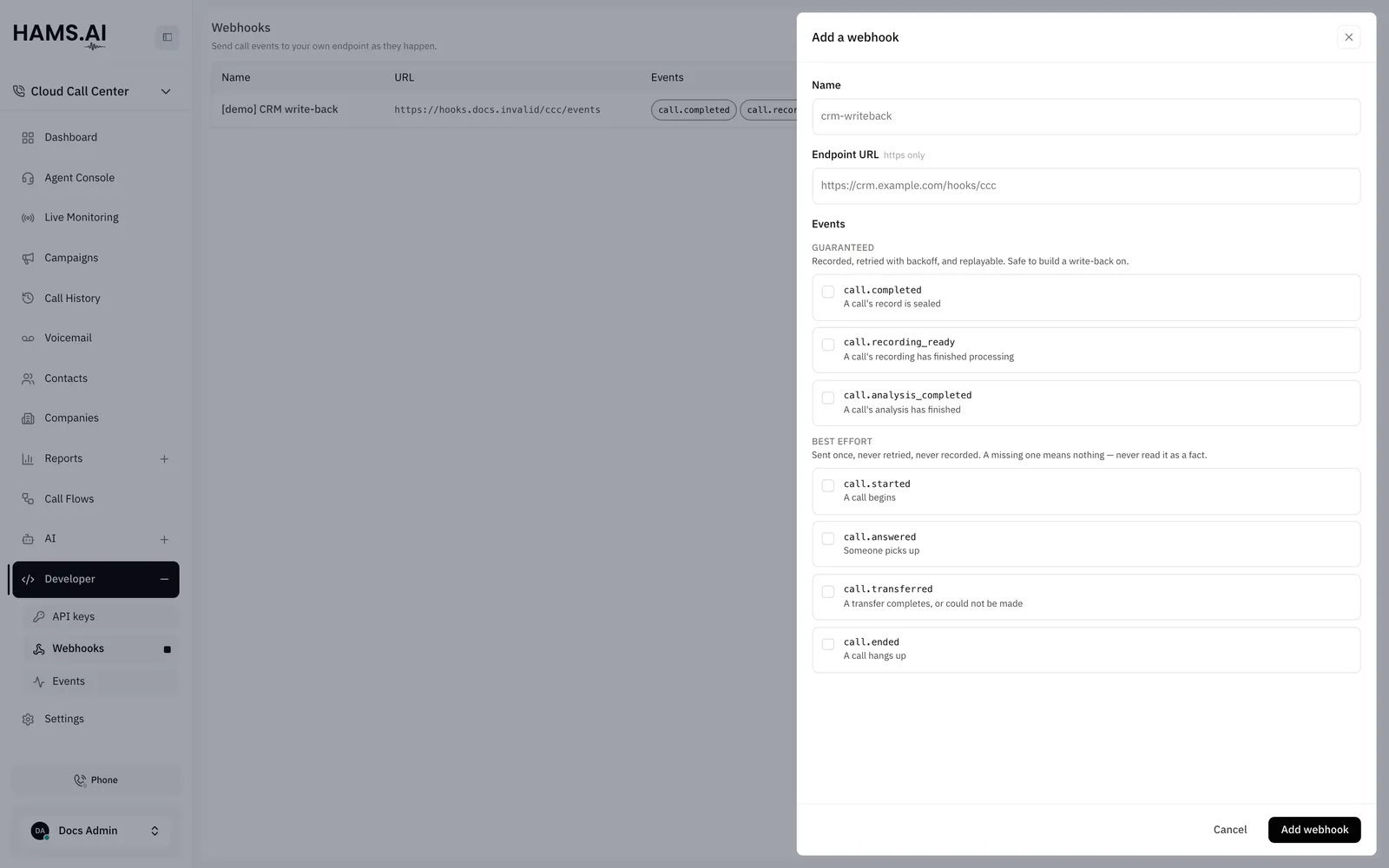
The Add webhook drawer has a name, an https endpoint, and the events to subscribe to, in guaranteed and best-effort groups.

Event tiers

Events have 2 tiers. The tier decides what you can build on an event.

TierEventsPromise
Guaranteedcall.completed, call.recording_ready, call.analysis_completedThe system records the event before it sends it. It retries with backoff, keeps a dead delivery after the last attempt, and can replay it. You can build a write-back on these events
Best-effortcall.started, call.answered, call.transferred, call.endedThe system sends the event once from the live call. It never retries and never records the event. The absence of an event means nothing

A best-effort event is a hint about a call in progress. Use it to update a screen. Do not use it to update a record. The record of a call is call.completed. Reconcile against call.completed or against GET /cdrs. Never reconcile against the best-effort tier.

EventWhen it fires
call.startedA call begins
call.answeredA party answers
call.transferredA transfer completes or fails
call.endedThe call ends
call.completedThe system seals the record of the call, a few seconds after the call ends
call.recording_readyThe system finishes the recording of the call
call.analysis_completedThe post-call analysis of the call gives a result. See Post-call analysis

Create a subscription

curl -X POST https://telephony.hams.ai/api/developer/v1/webhooks \
-H "Authorization: Bearer $CCC_KEY" \
-H "Content-Type: application/json" \
-d '{
"name": "crm-writeback",
"url": "https://crm.example.com/hooks/calls",
"event_types": ["call.completed", "call.recording_ready"]
}'

The 201 response has the endpoint and a secret. The secret is the HMAC key for the signature of the endpoint. The response shows it one time. The dashboard also shows it one time, on its confirmation screen. Store it now.

The URL must start with https://. Use PATCH /webhooks/{id} to change the name, the URL, the events, or is_active. While an endpoint is inactive, the system records no deliveries for it. When you activate it again, the deliveries that are already queued resume. DELETE /webhooks/{id} removes the endpoint and its queued deliveries. GET /webhooks lists your subscriptions.

The envelope

Every delivery, in either tier, is one JSON body:

{
"id": "0192a1b2-3c4d-7e5f-8a9b-0c1d2e3f4a5b",
"type": "call.answered",
"version": "2026-09-22",
"created_at": "2026-09-22T10:00:05.120000+00:00",
"occurred_at": "2026-09-22T10:00:05.004000+00:00",
"data": { }
}
KeyMeaning
idThe id is the same for retries and replays. Deduplicate on it
typeOne of the event names above
versionThe contract that the body follows. It changes only for a change that an existing parser cannot accept
created_atThe time when the system created this delivery
occurred_atThe time when the fact that the event describes happened
dataThe payload of the event

A new key in data or a new event type does not change version. Read the keys that you need and ignore the others.

Verify a delivery

Every request has a signature header:

X-CCC-Signature: t=1787913600,v1=3f9c…

v1 is HMAC-SHA256("<t>.<raw body>") with the secret of the endpoint as the key. It is hex encoded. Compute it over the raw bytes that you received. Do not use a re-serialized body. Compare with a constant-time comparison. Reject a t that is older than your tolerance. The timestamp is in the signed string, so nobody can replay a captured request later.

import hashlib, hmac, time
def verify(secret: str, header: str, body: bytes, tolerance: int = 300) -> bool:
parts = dict(p.split("=", 1) for p in header.split(","))
signed = f"{parts['t']}.".encode() + body
expected = hmac.new(secret.encode(), signed, hashlib.sha256).hexdigest()
fresh = abs(time.time() - int(parts["t"])) <= tolerance
return fresh and hmac.compare_digest(expected, parts["v1"])

Answer with a 2xx status quickly. Do the work after you answer. Any other status, or a timeout, counts as a failed attempt in the guaranteed tier.

Payloads

The data of every call.* lifecycle event starts with the same 5 keys:

{
"call_id": "0192...",
"direction": "inbound",
"from": { "number": "+2010000000", "type": "external" },
"to": { "number": "1000", "type": "did" },
"started_at": "2026-09-22T10:00:00+00:00"
}

direction is inbound or outbound. In call.completed, it can also be internal. A party type is external, did, or extension. For a call that the API places, the live events show from as the extension and to as the dialed number. call_id is the id of the call in call history. call.completed shows the numbers of the sealed record. See Outbound calls.

A best-effort event for a campaign call also has the field campaign_id, after the 5 keys. The event call.completed does not have it. See Campaigns.

Each event then adds its own fields.

call.started

FieldMeaning
flow_idThe call flow that the call entered. null for an outbound call

call.answered

FieldMeaning
answered_atThe time when the party answered
party{ kind, extension, user_id, name, destination }. kind is agent or external. A field is null when it does not apply

An agent party has extension. It also has user_id and name when the extension belongs to a user. An answer from a queue has the extension only. An external party has destination. An example is the number that an API-placed call dialed.

call.transferred

FieldMeaning
statuscompleted or failed
failure_reasonchain_cap (too many transfers on one call) or unresolved (the target does not exist). null when the transfer completed
from_extensionThe agent who asked for the transfer, when known
target{ kind, number }. kind is extension or queue. If the transfer failed, kind is null and number is the requested number
modeblind or attended

call.ended

FieldMeaning
statuscompleted, interrupted, or failed
outcomeanswered, no_answer, busy, abandoned, canceled, failed, or voicemail. The sealed record can refine it
answered_atThe time when the call was first answered, or null
ended_atThe time when the call ended

call.completed

This event is the sealed record. It has the core, then the outcome and the durations that reports use:

{
"call_id": "0192...",
"direction": "inbound",
"from": { "number": "+2010000000", "type": "external" },
"to": { "number": "1000", "type": "did" },
"outcome": "answered",
"outcome_detail": "queue",
"started_at": "2026-09-22T10:00:00+00:00",
"answered_at": "2026-09-22T10:00:09+00:00",
"ended_at": "2026-09-22T10:02:12+00:00",
"total_seconds": 132,
"talk_seconds": 118,
"queue_wait_seconds": 9,
"agent": { "user_id": "0190...", "extension": "2001", "name": "Ada" }
}

outcome_detail is external when a trunk leg to an external system decided the call. A call that a voice agent handled has outcome: answered and outcome_detail: voice_agent. See Call history and recordings for all values.

call.recording_ready

This event is not a call lifecycle event, so it does not carry the core. call_id is null when the system cannot match the recording to a call.

{
"recording_id": "0192...",
"call_id": "0192...",
"duration_ms": 118420,
"size_bytes": 1894720,
"recording_url": "https://telephony.hams.ai/api/v1/recordings/public/<token>/audio",
"recording_url_expires_at": "2026-09-23T10:04:00+00:00"
}
FieldMeaning
recording_urlA public link to the stereo WAV. It needs no credentials. It is null when the service has no public base URL
recording_url_expires_atThe time when the link expires. It is null when recording_url is null. The link lasts 24 hours by default

Download the recording before recording_url_expires_at. After that time, the link returns 404.

A replay sends the original link without a change. After the link expires, use GET /recordings/{recording_id}/audio with your API key. See Call history and recordings.

call.analysis_completed

This event is not a call lifecycle event, so it does not carry the core. The system sends it when the post-call analysis of a call gives a result. A failed or skipped analysis sends no event.

{
"call_id": "0192...",
"analysis_id": "0192...",
"attempt": 1,
"profile": { "id": "0192...", "name": "Support calls" },
"summary": "The customer asked about a late order. The agent gave a new delivery date.",
"outcome": "resolved",
"sentiment_start": "negative",
"sentiment_end": "positive",
"contact_reason": "The customer called about a late order.",
"agent_score": 4,
"agent_score_reason": "The agent was polite and solved the problem quickly.",
"labels": ["Delivery"]
}
FieldMeaning
attemptThe number of the analysis of this call. Each new analysis of the same call sends a new event with a higher attempt. Keep the event with the highest attempt for each call_id
profileThe profile that made the result. id is null when someone deleted the profile
summary2 or 3 sentences about the call, in the language of the profile
outcomeresolved, unresolved, escalated, or customer_silent
sentiment_start, sentiment_endThe mood of the customer at the start and at the end: very_negative, negative, neutral, positive, or very_positive
contact_reason1 sentence that tells why the customer called
agent_score1 to 5 for the human agent. null when no human agent spoke
agent_score_reason1 sentence that gives the reason for the score. null when agent_score is null
labelsThe labels from the profile that apply to the call. The list can be empty

occurred_at in the envelope is the time when the analysis completed.

Deliveries, retries, and replay

The guaranteed deliveries are in Developer › Events and at GET /webhooks/deliveries. The newest delivery is first. Each delivery shows the body that the system sent, the attempt count, the next attempt time, and the last error. You can filter by endpoint and by status: pending, delivered, or dead.
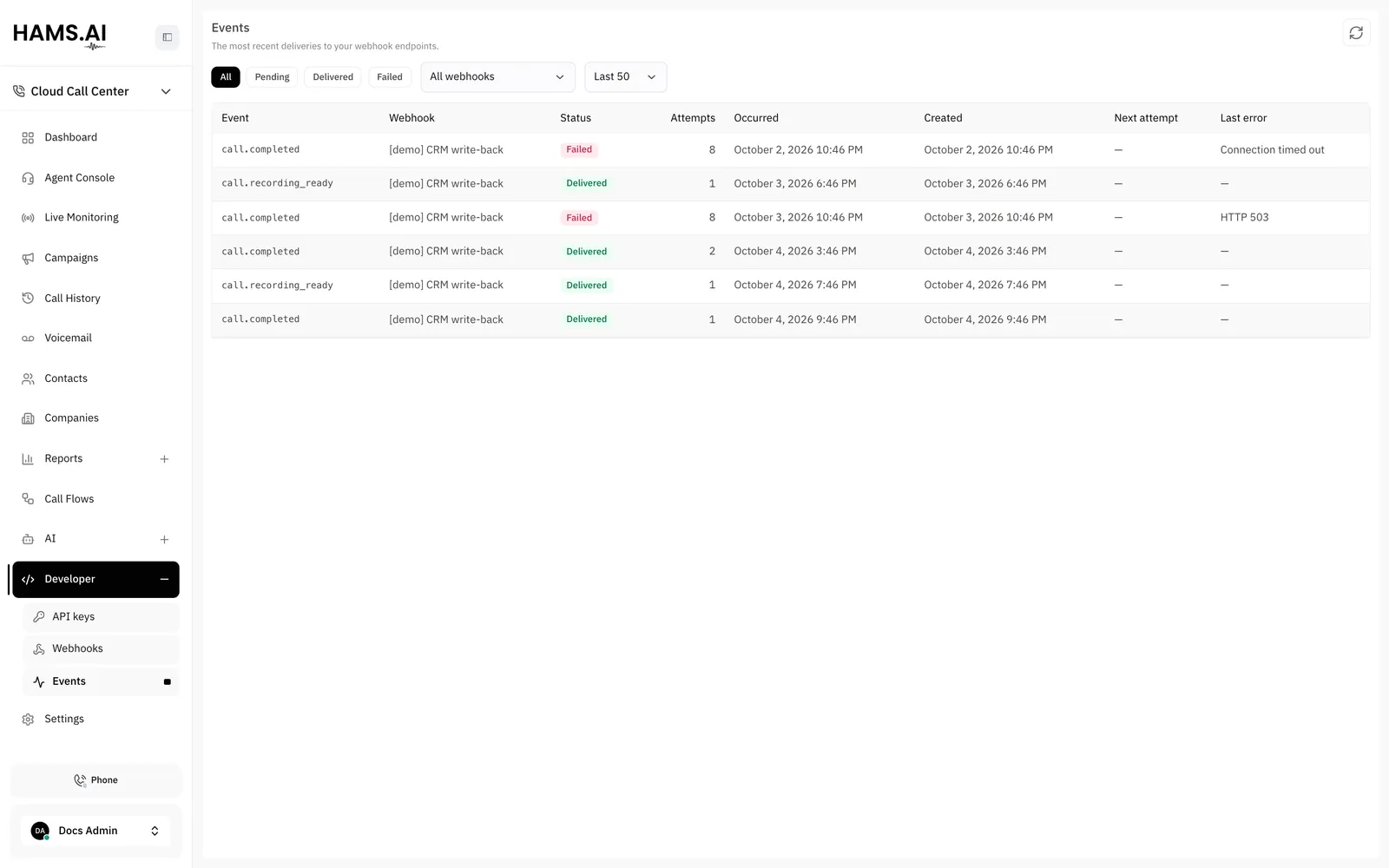
The Events page shows the status, attempt count, next attempt, and last error of each guaranteed delivery.

The system retries a failed attempt with a longer delay each time. After the last attempt, the system marks the delivery as dead and keeps it. To send it again, click Replay in the drawer, or use POST /webhooks/deliveries/{id}/replay. The system sends the original body again with the same event id. If you deduplicate on id, you see 1 event and not 2.

Best-effort events never show in this list. An endpoint that subscribes only to best-effort events has an empty Events page. The page is empty on purpose.