

Workflows
A workflow automates a conversation. It is a graph of nodes that the conversation goes through in order. A node can send a message, or ask a question and wait for the answer. Other nodes tag the contact, call an external API, or assign the conversation to a team. You draw the graph on a canvas. You do not write rules.
Workflows are off by default. Hams support turns on the Workflows + Agent feature for your account. The same feature turns on the AI agent. Only administrators can see Workflows in the sidebar, build workflows, and see runs. Any agent who can open a conversation can take over the conversation from a workflow. Any agent of the account can start a manual workflow through the API.
In this page, {account_id} is the number of your account in the dashboard URL.
The workflows list
Click Workflows in the sidebar. Then click All workflows. The Workflows page opens at /app/accounts/{account_id}/workflows.
The list shows the name, the status, the creator, the last editor, and the dates of each workflow. To find a workflow, type in Search by workflow name…. To show only one status, use Filter.
The Actions menu of each row has these items:
- Open, Publish, Stop, Resume, and Delete. The menu shows only the items for the status of the workflow.
- View runs. It opens the Runs page with a filter for this workflow. See Runs.
- Regenerate. It shows only for a workflow with the Incoming webhook trigger. See Incoming webhook.
Create a workflow
Set the trigger
Click the Trigger node. In Trigger event, select the event that starts the workflow. See Triggers.
Build the graph
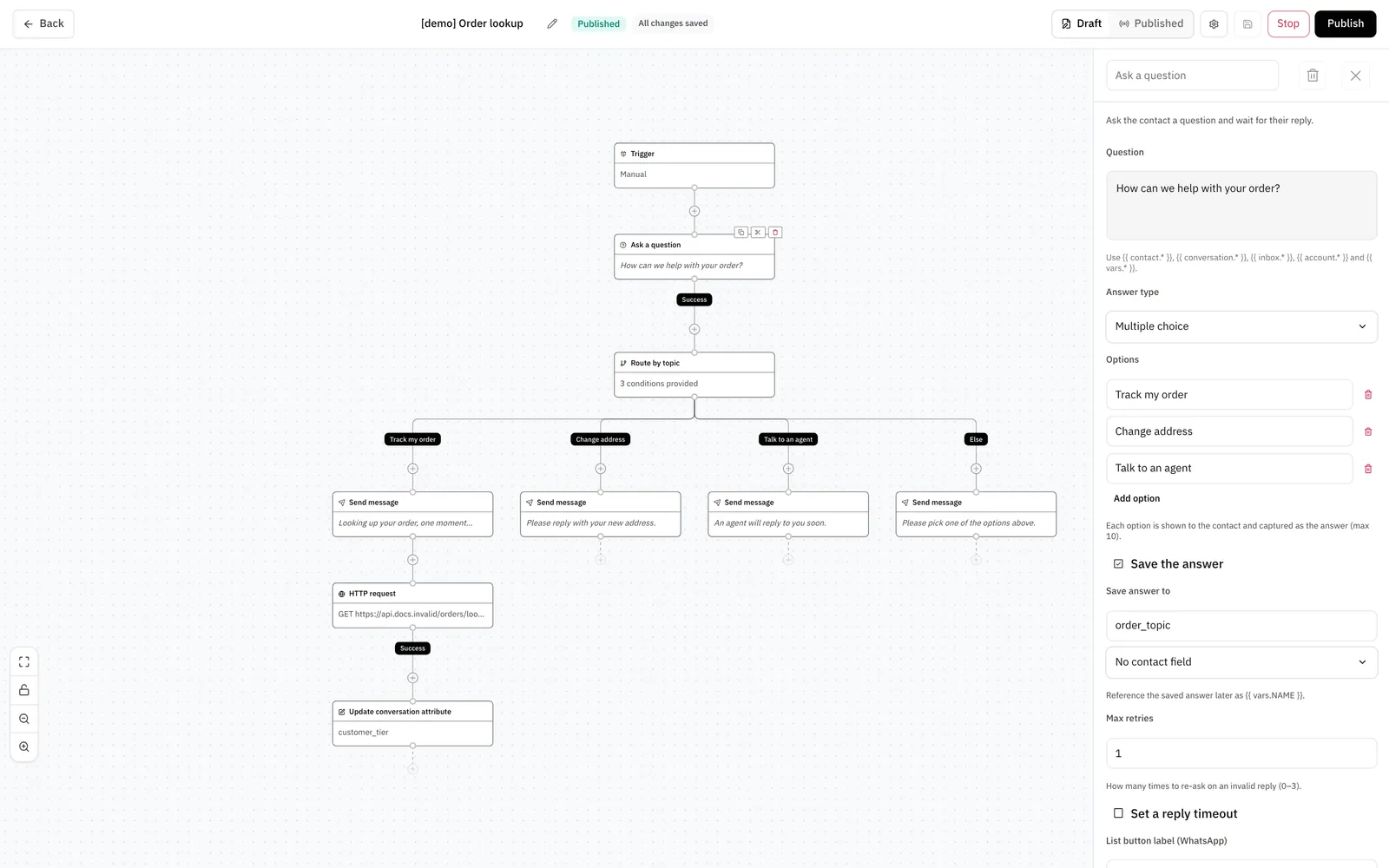
Each node has one connector for each outcome. For example, Ask a question has the outcomes Success, Invalid, and Timeout. The run follows the connector of the outcome that occurred. If a connector has no node, the run ends there.
Some outcomes are optional. To add the branch of an optional outcome, turn it on under Optional outcomes in the side panel. If you leave it off and the outcome occurs, the run ends.
You can do these actions on the canvas:
- To rename a node, type a name at the top of the side panel. A name has a maximum of 30 characters.
- To copy a node with the nodes below it, click Copy node and its branches. To move them, click Cut node and its branches. Then click a +. The Add a node list shows Paste and the name of the node. Click it.
- To delete a node with the nodes below it, click the delete icon in the side panel. The Delete this node and its branches? dialog opens. Click Delete nodes. You cannot undo this action.
- To move the canvas, drag an empty area. To zoom, use Zoom in, Zoom out, or Fit to screen.
- To stop accidental changes, click Lock canvas.
The builder checks the graph before it publishes. If a node is not complete, the builder shows Not configured on the node and an error in the side panel.
Draft, published, and stopped
Each workflow has 2 graphs: the draft that you edit and the published graph that runs. A change to the draft does not change the published graph. To see each graph, use the Draft and Published switch in the header. You cannot edit the published graph.
Publish replaces the published graph with the draft. The change applies immediately to new conversations. A run that already started continues on the graph that it started with. You cannot undo a publish. To go back, change the draft and publish again.
Stop takes the workflow out of service and cancels all runs that did not finish. The system does not undo the actions that these runs already did. Each conversation gets an activity line that says that the workflow stopped. Resume puts the published graph back into service. Publish on a stopped workflow also puts it back into service.
To make a copy, open More actions in the builder. Then click Duplicate. The copy has the name of the workflow with (copy) at the end.
Do not delete a workflow if you need its run history. When you delete a workflow, the system also deletes all its runs. You cannot undo it. To take a workflow out of service, use Stop.
Triggers
The trigger decides which conversations go into the workflow.
To start the workflow only for some conversations, add Conditions to the trigger. The conditions apply to all trigger events, Manual included. To stop repeat runs, select Run only once per conversation or Run only once per contact.
A run starts after a short delay.
Manual trigger
A workflow with the Manual trigger starts only when something asks for it. It can start in 2 ways:
- A Run workflow node in the after-call sequence of a Cloud Call Center call flow. The node can give values to the workflow as
vars.*. See After-call sequences. - A request to the dashboard API:
POST /api/v1/accounts/{account_id}/workflows/{workflow_id}/triggerwith theconversation_idin the body. Any agent of the account can send it.conversation_idis the internal ID of the conversation. It is not the number in the dashboard URL, and it is not theidin a developer API response. To get it, readconversation_idfrom Pre-call context.
You must publish the workflow first. If the conversation does not match the conditions, or a run of the workflow is already active on it, the request starts no run.
Incoming webhook
A workflow with the Incoming webhook trigger gets its own URL when you publish it. The builder shows the URL under Webhook URL:
The token in the URL is the only credential. To change the token, click Regenerate. The old URL does not work after that. The graph of the workflow does not change.
The body identifies the conversation. Send the conversation directly, or send the contact and the inbox:
The conversation_id here is the same internal ID as in the Manual trigger section.
The contact must exist. The webhook does not create a contact. If the contact has an open conversation in that inbox, the workflow uses it. If not, the system creates a new conversation.
The system accepts the request with 202 and starts the workflow a short time later. An unknown token gets 404.
When a workflow runs
A conversation has only 1 live run at a time. If a second workflow starts on the same conversation, its run gets the status Queued. It starts when the first run ends. If a queued run waits for more than 1 hour, the system cancels it.
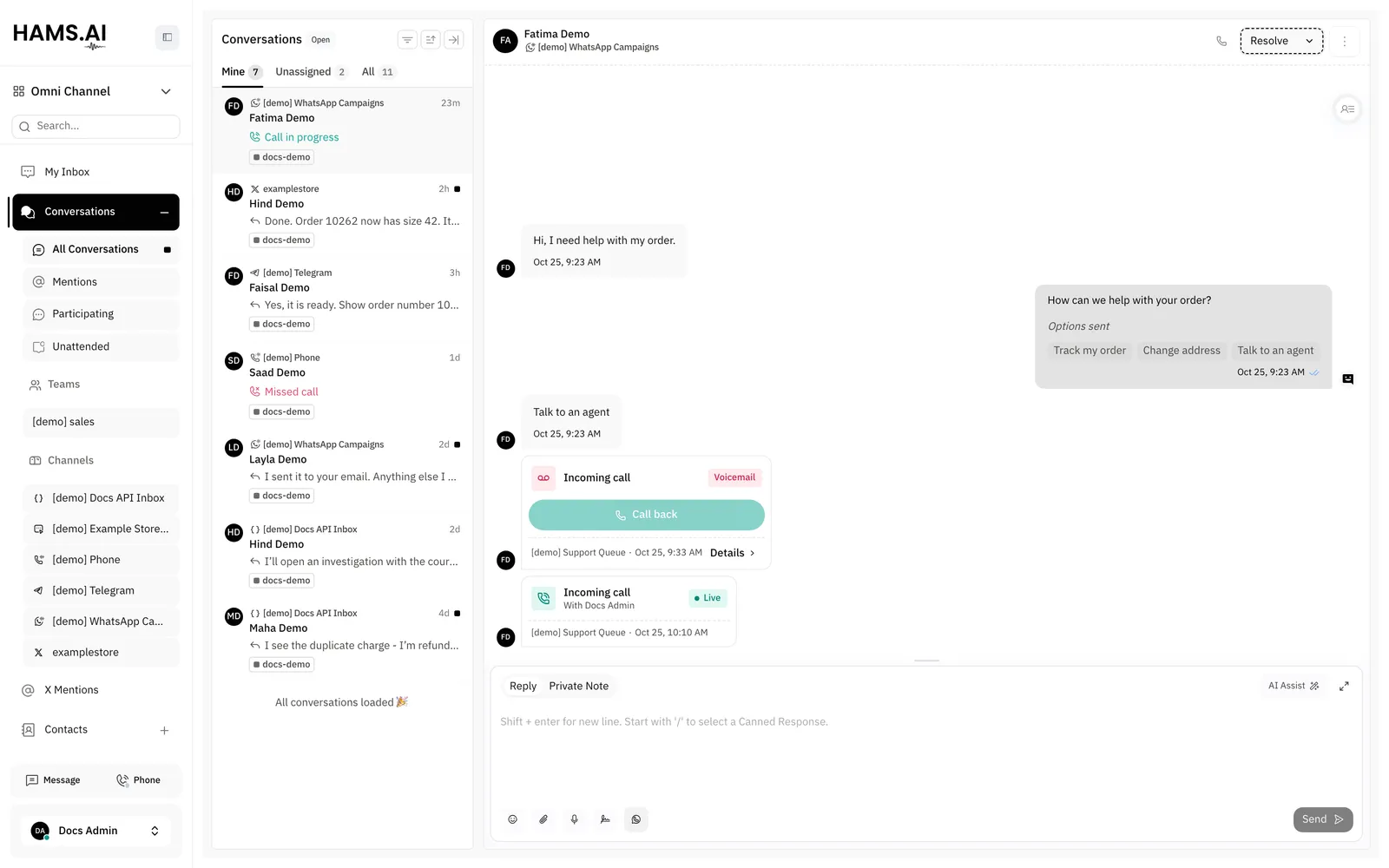
While a run is live, the reply box shows a banner with the name of the workflow: The workflow “{name}” is running on this conversation. Take over to act on it. Agents cannot reply until they take over. To take over, click Take over. The system cancels the run. Private notes stay available during the run.
The AI agent does not reply to a conversation while a workflow runs on it. In a WhatsApp or SMS inbox, a workflow also runs on a conversation that contains only calls. Workflows do not run in a Phone inbox. See Voice.
The conversation shows an activity line for each change of the run:
A run can do a maximum of 100 nodes. The workflow must use a Jump node to go back to an earlier node.
Node reference
Send message
The node sends the text in Message on all channels. On a WhatsApp inbox, it can send an approved template instead. To do this, click Add channel override and set these fields:
- WhatsApp inbox: the inbox that sends the template. Each inbox can have 1 override.
- Template: the approved template.
- When to send the template: Always send the template or Only when the 24h window is closed.
- The template parameters. You must fill in every parameter. They can contain variables.
Some channels, such as WhatsApp, accept a free-form text only for a limited time after the last message of the customer. If the node must send text after that time, it sends nothing. The run takes the Failure branch.
Ask a question
The node sends the question and waits for the reply of the customer. Select an Answer type: Text, Multiple choice, Number, Email, Phone, URL, Date, or Time.
- A Multiple choice question has a maximum of 10 options. The customer can reply with the text of an option, its value, or its number in the list.
- If a reply does not match the answer type, the node asks again. Max retries sets how many times, from 0 to 3. After the last retry, the run takes the Invalid branch.
- To save the answer, select Save the answer and enter a name in Save answer to. Later nodes read it as
{{ vars.NAME }}. The node can also save the answer to a contact field.
To stop the wait after a set time, select Set a reply timeout. The timeout is from 1 second to 10 days. If no usable reply comes in that time, the run takes the Timeout branch. Without a timeout, the run waits for a reply for a maximum of 14 days. Then the system cancels it.
Variables and conditions
Nodes can put live values into text with double braces:
The objects contact, conversation, inbox, and account give their fields. The object vars holds each answer and each HTTP value that the run saved. A variable name starts with a letter or an underscore, and contains only letters, digits, and underscores.
A Branch node has one or more branches. Each branch has conditions and Match all conditions or Match any condition. A condition compares a Source with a value. The source is Conversation or contact attribute or Workflow variable.
For Conversation or contact attribute, the attribute list has the conversation attributes and the custom attributes of the conversation. It also has these contact attributes. Each shows as Contact followed by the name: Name, Email, Phone number, Identifier, Country code, City, Company name, and Blocked. It also has the custom attributes of the contact. A checkbox attribute takes the value True or False. For the Assignee name attribute, Is present matches a conversation that an agent or an AI agent owns. The same list is available in the Conditions of the trigger.
For a workflow variable, these operators are available: Equals, Does not equal, Contains, and Does not contain. Starts with, Is present, Is not present, Greater than, and Less than are also available. Greater than and Less than compare numbers. The other operators compare text. The run tries the branches from top to bottom and takes the first branch that matches. If no branch matches, the run takes Else.
HTTP request
The node calls an external API with the URL, Method, Headers, and Body that you set. The methods are GET, POST, PUT, PATCH, and DELETE. The URL, the headers, and the body can contain variables.
- Authentication is None, Bearer token, or Basic auth. A bearer token can contain variables. Basic credentials cannot.
- Response mappings save values from a JSON response. In the first field, enter a path such as
data.0.id. Enter$for the whole response. In the second field, enter the variable name. Later nodes read the value as{{ vars.NAME }}. - The request stops after 10 seconds with no answer. The request always identifies itself with the user agent
hams-workflow.
If the API answers, the run takes Success. If the request fails or the API answers with an error, the run takes Failure. If a path in Response mappings is not in the response, the run does not fail. The variable stays empty.
The run records the request and the response for the Runs page. The record hides the values of secret headers, such as Authorization, Cookie, and X-API-Key. It also hides query parameters whose names contain token, key, secret, or signature. The record keeps only the first 4 KB of each body.
Update contact field and Update conversation attribute
Both nodes have 3 modes:
Update contact field writes the standard fields Name, Email, Phone number, Identifier, Middle name, Last name, Location, Country code, Contact type, and Company. It also writes custom attributes. Update conversation attribute writes only custom attributes of the conversation.
In JSON mapping and Spread a variable modes, the node ignores keys that are not a standard field or a custom attribute of the account.
Send CSAT survey
The node asks the contact to rate the conversation. It sends the survey in all conversation statuses. It does not use the CSAT setting of the inbox. The text comes from Survey message. The ratings show in the CSAT report together with all other surveys.
How the rating is collected has 2 values:
- Survey link: the contact rates on a survey page. Select a Rating style, Emoji or Stars. Delivery is Automatic, Message only, or Approved template only. Automatic sends the approved CSAT template of the inbox on WhatsApp, and a message on other channels.
- Buttons in the conversation: the contact rates with buttons in the chat. The run waits for the rating. If no rating comes before the Reply timeout, the run takes No response. The default timeout is 24 hours.
If a channel cannot show buttons, the node sends a survey link. Don’t re-send within (days) stops a second survey to the same contact in that number of days. The default is 7.
Buttons and lists
On WhatsApp, Telegram, LINE, the website widget, the API channel, and Facebook Messenger, a node with options shows reply buttons or a list. The customer does not have to type a number. WhatsApp shows up to 3 options as buttons and more options as a list. To name the button that opens the list, use List button label (WhatsApp), with a maximum of 20 characters.
On Instagram, email, SMS, and all other channels, the node sends a numbered menu. The customer replies with the number or the text.
Runs
The Runs page shows the runs of all workflows in the account. Click Workflows in the sidebar. Then click Runs. The page opens at /app/accounts/{account_id}/workflows/runs.
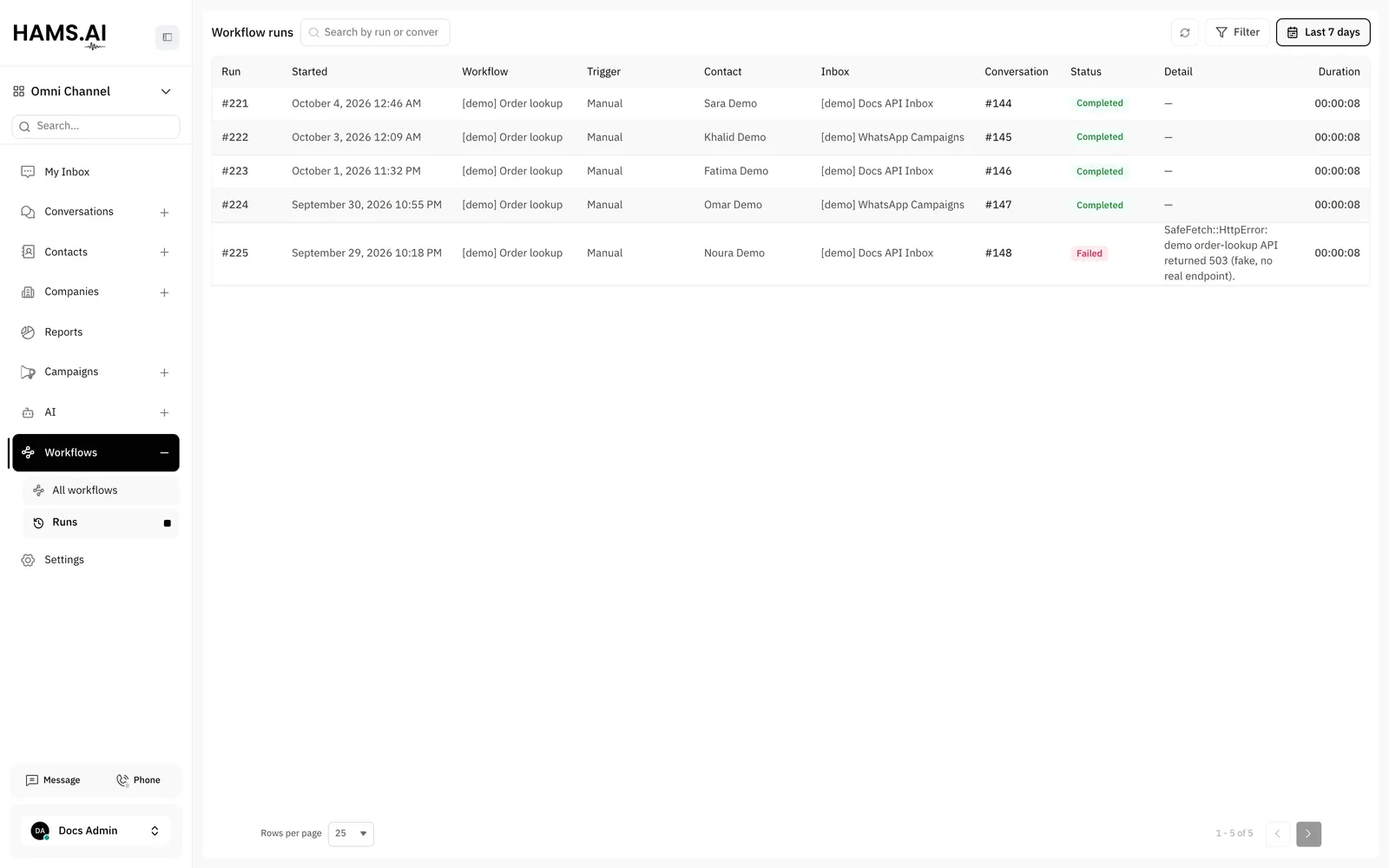
The table has the columns Run, Started, Workflow, Trigger, Contact, Inbox, Conversation, Status, Detail, and Duration. Detail shows the error of a failed run. Click a conversation number to open the conversation.
To find runs, use these controls:
- Search by run or conversation ID: enter the number of a run or of a conversation. The search accepts only digits.
- Filter: select one or more statuses and one workflow. Then click Apply.
- Time Range: select Today, Last 7 days, or Last 30 days, or set From and To. The page opens on Last 7 days. The range uses the start time, so queued runs do not show.
- Refresh: loads the list again.
The run drawer
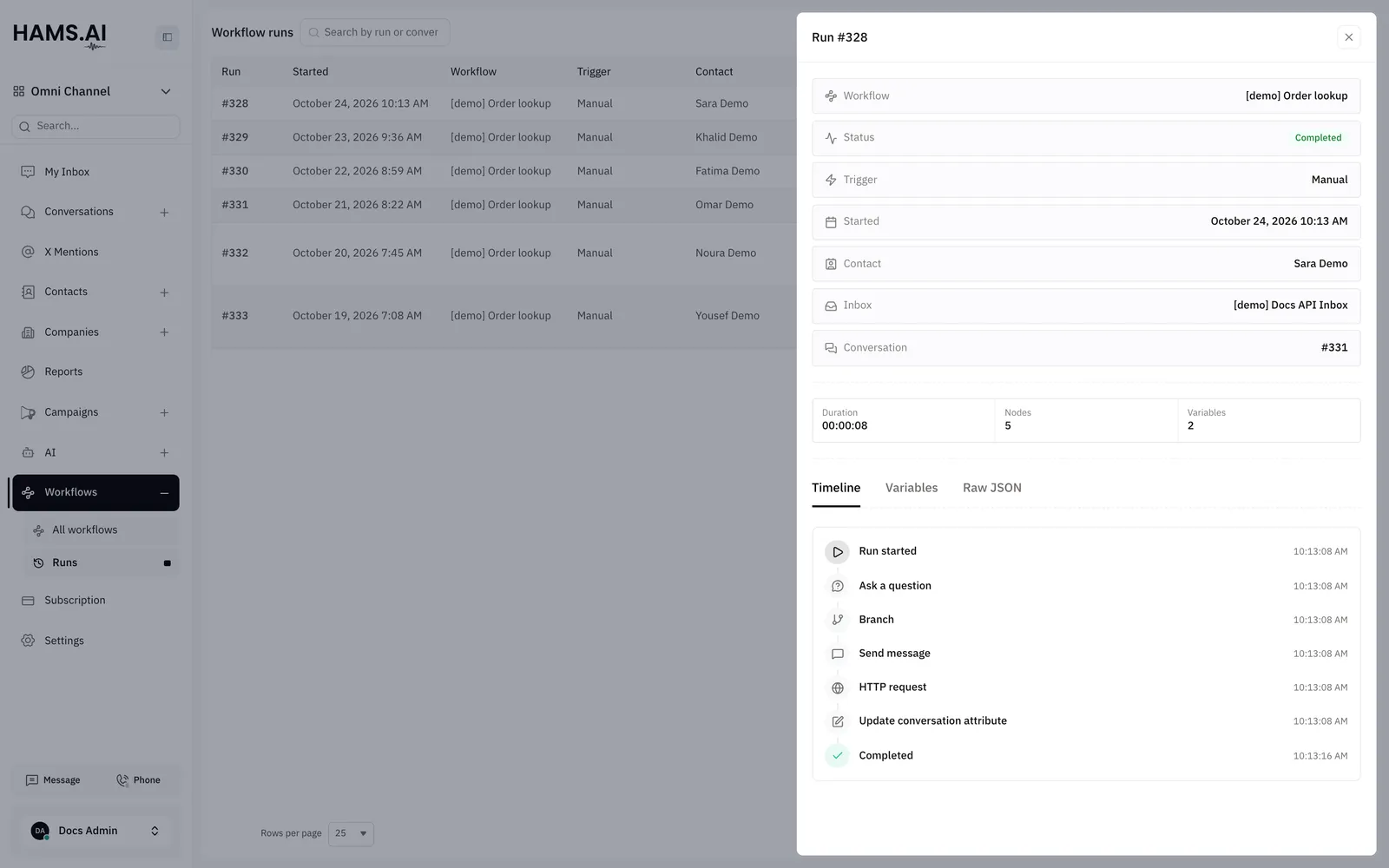
Click a row. The Run # drawer opens with 3 tabs:
- Timeline: each node that the run did, with its outcome. For an HTTP request node, click Show request and response to see the headers and the body of each. A hidden value shows Hidden. A long body shows Truncated at 4 KB.
- Variables: the variables that the run set.
- Raw JSON: the full record of the run. To copy it, click Copy JSON.
A long run keeps only its most recent 200 timeline entries. The timeline then shows Earlier nodes trimmed.
Attributes that must have a value
This setting is not a workflow, but it also controls how agents close conversations. An administrator can select conversation attributes that must have a value. Then an agent cannot resolve a conversation until these attributes have a value.
The setting is off by default. Hams support turns on Required Conversation Attributes for your account. Then set the attributes in Settings > Conversation Workflow > Attributes required on resolution. When an agent resolves a conversation and one of these attributes is empty, the Resolve conversation dialog lists the attributes. The conversation stays open until the agent fills them in.