

WhatsApp campaign reports
The WhatsApp campaign report shows the totals of all your WhatsApp campaigns of a period, and one row for each campaign. In Reports, the tab of this report is WhatsApp Campaigns. For the contacts of one campaign, open the analytics page of that campaign.
This report does not include Cloud Call Center call campaigns or Voice AI Platform outbound batches.
The report shows only when Hams support turns on WhatsApp Campaign for your account. Administrators and users with the Manage reports permission see the tab. Only administrators can load the data of the report. The report includes only campaigns of WhatsApp inboxes.
Open the report
To show the campaigns of one inbox, select the inbox in the inbox filter of the header. If you select no inbox, the filter shows Inboxes.
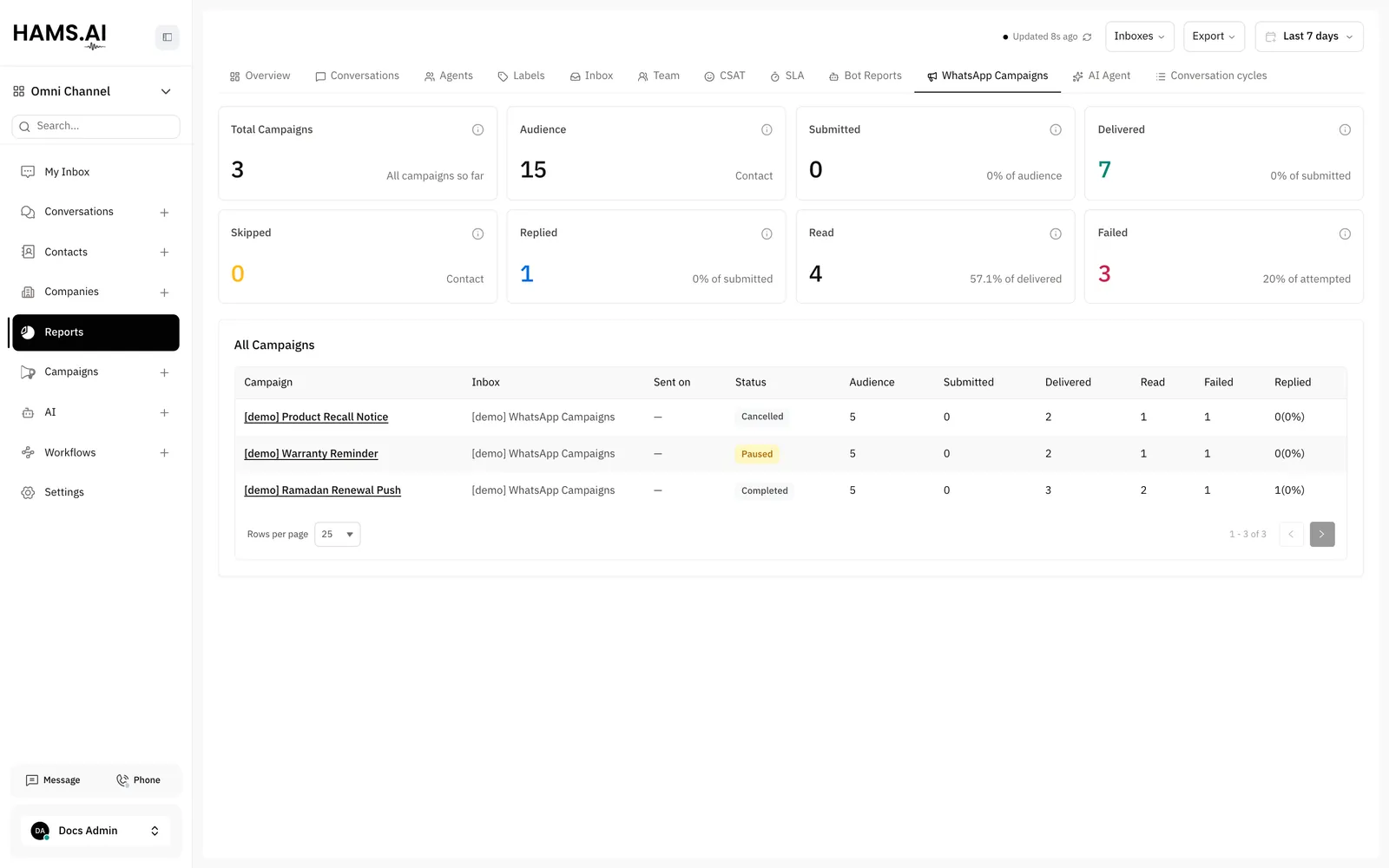
Summary cards
The cards add up the contacts of all campaigns in the period.
Each percentage uses a different base. The analytics page of a campaign uses the audience as the base. Thus, its Delivered percentage can be different from this report.
The campaign table
The All Campaigns table lists the campaigns with the newest first. It shows 25 rows on each page by default. Select 10, 25, or 50 rows for each page.
The table has these columns:
- Campaign: the title of the campaign. Click the title to open the analytics page of the campaign.
- Inbox: the WhatsApp inbox that sends the campaign.
- Sent on: the date and time when the campaign started. A campaign that did not start shows
—. - Status: Scheduled, Processing, Paused, Completed, or Cancelled.
- Audience, Submitted, Delivered, Read, and Failed: the counts of the campaign.
- Replied: the count of replies and, in parentheses, the percentage of the submitted messages.
If no campaign matches the period and the filter, the table shows “No WhatsApp campaign data for the selected period.”
Export the report
Click Export in the header. Then click Download WhatsApp campaigns. The file whatsapp-campaigns.csv downloads to your computer.
The file includes all campaigns of the period and of the inbox filter, not only the rows of the current page. It has 1 row for each campaign. It has these columns: Campaign, Inbox, Status, Started at, Completed at, Audience, Sent, Delivered, Read, Failed, Skipped, and Replied.
- Sent in the file is the same count as Submitted in the report.
- Status uses the system values:
activefor Scheduled,processing,paused,completed, andcancelled. - Started at and Completed at use the ISO 8601 format in UTC.
- The column names use the language of your dashboard.
- The file starts with a UTF-8 byte order mark, so spreadsheet applications show Arabic names correctly.