

Tools
A tool is something an agent can do: look a customer up, book a slot, hand the call to a person, search your documents. Without tools an agent can only answer from its prompt, so tools are what turn a good conversation into a completed task.
Tools are built once under Tools in the sidebar and then selected on an agent, so the same tool can serve several agents. Building one does not attach it to anything; that happens on the agent.
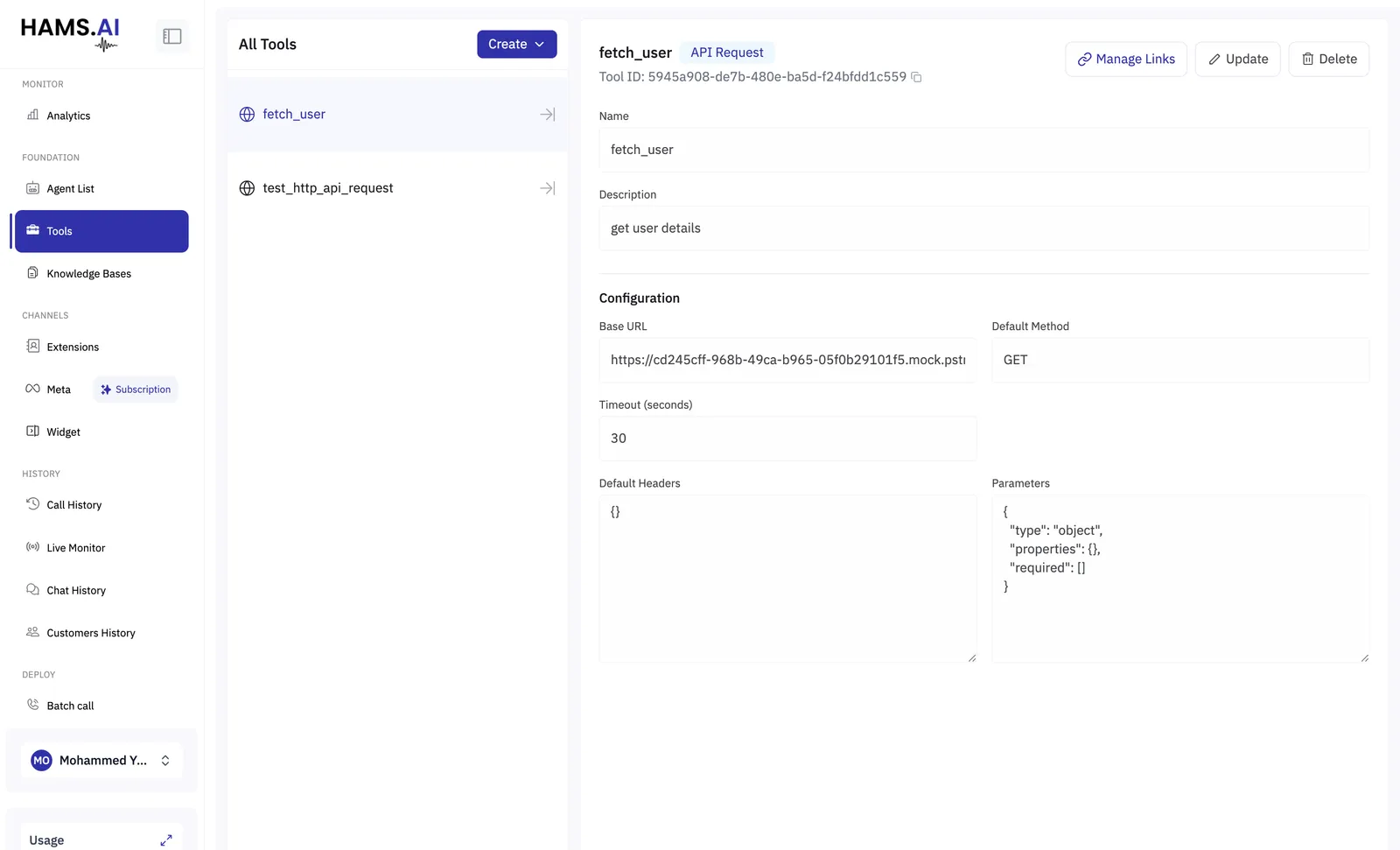
How an agent decides to use one
This is the part worth understanding before you build anything.
You do not tell an agent when to call a tool. The model reads each tool’s name and description and decides for itself, mid-conversation, which one fits what the caller just said. So both are functional text, not labels:
A tool named tool_2, or described as “the CRM endpoint”, will be called at the wrong moment or not
at all. If an agent keeps missing a tool, the description is almost always the thing to fix.
Names are lower-case letters, digits and underscores, starting with a letter, up to 100 characters.
Parameters
Parameters are the values the model fills in when it calls the tool. Each one has a type, and a description that tells the model what to put there.
Mark a parameter required only when the tool genuinely cannot run without it. A required parameter the caller has not mentioned forces the agent to ask for it, which is right for a booking reference and wrong for an optional note.
Parameter descriptions matter as much as the tool’s own. “The appointment date the caller wants to move to, not the existing one” prevents a class of error no amount of prompt-writing will.
The five types
The type is chosen in Create Tool and decides what the rest of the form asks for.
API Request
The one most tools are. The agent calls an endpoint of yours and uses what comes back.
Keep the timeout well under what a caller will tolerate. Thirty seconds of silence on a phone call is a hang-up, so pair a slow endpoint with Speak During Execution on the agent, or make it faster.
Body template. For POST, PUT and PATCH you can shape the request body rather than sending
the model’s arguments as-is. String values support {{param:NAME}} for a raw call argument and
{{variable}} for a conversation variable. Without a template, the arguments are sent as the JSON
body.
Injected parameters. Some values should come from the conversation rather than from the model — the caller’s own phone number, an account ID you already know. These are mapped from the conversation’s variables and set on the request directly. The model never sees them, cannot be talked into changing them, and a key that is injected must not also be a parameter.
Injected parameters are the right way to handle anything identifying. If the agent asks the caller for their account number and passes what it hears, a caller can say someone else’s. If the number is injected from the conversation, they cannot.
Two call-context values can also be attached automatically: the current phone number and the extension number.
Mock response. A tool can return a fixed value without making any request, which lets you build and test an agent before the endpoint behind it exists.
Data Map
A lookup table. You give it a list of patterns and the output each one returns, and it answers from that list instead of calling anything.
Use it for small, stable mappings — a branch code to a branch name, a plan name to its price, where an API call would be overkill and putting the whole table in the prompt would be worse. It is instant, cannot fail, and costs nothing.
A Data Map takes exactly one parameter: the value being looked up. Matching is case-insensitive.
Transfer Call
Hands the live call to an extension. Voice agents only.
INTERNAL needs the trunk the target agent sits on; the other two must not have one.
Set Reasons, even though they are optional. The agent picks one at transfer time and it is stored on the call, which is what later tells you why calls are being escalated rather than just how many.
A Conversation Flow also has a Call Transfer node. Use the node when the transfer is a step in a flow you drew. Use this tool when the agent should be able to transfer at any point, judging for itself that it is time.
Knowledge Base Search
Searches one or more of your knowledge bases and returns what it finds, so the agent can answer from your documents rather than from its prompt.
Point it at the bases the agent should draw on. Prefer a tool per subject over one tool across everything: a search scoped to the right documents returns better answers than one scoped to all of them.
See Knowledge bases for building the bases themselves.
Client Action
The odd one out. A client action is not carried out here at all. When the agent calls it, your application receives an event carrying the values the model filled in, and decides what to do.
Use it when the thing that must happen lives in your product and not in ours: closing a chat and routing it to a human, opening a page, filling a form the customer is looking at.
The conversation carries on either way. The agent is told the action was passed on, so the turn completes normally, and whether anything actually happens is your application’s decision.
Credentials
Manage Links attaches a credential to a tool, so a request is authenticated without the secret being written into the tool’s headers.
Credentials are stored separately and linked, so rotating one updates every tool that uses it, and a tool can be shared without exposing what it authenticates with.
Putting a tool on an agent
Building a tool does nothing on its own. To use it:
- Single Prompt — add it in the Tools panel. The agent may call it whenever it judges it useful.
- Conversation Flow — either add it as Global Tools, available at any conversation node, or bind it to a Function node so it runs at one definite point.
- Multi-Prompt — tools belong to the member agents, so add them to the member that needs them.
A tool the agent rarely needs still costs it something: every tool is described to the model on every turn. Give an agent the tools its job requires, not the whole library.
Organising
Tools can be grouped into folders, which matters once there are more of them than fit on a screen. Folders are for your convenience only — they do not affect which agent can use what.