

Single Prompt
A Single Prompt agent has one prompt, one model, and a set of tools it may call. Everything it knows about how to behave is in that prompt, and the model chooses what to say at every turn.
Use it when the conversation is open-ended, like answering questions, qualifying a lead, triaging a support call. It is the fastest type to build and the most forgiving of the unexpected: a caller who asks three questions at once, or answers something you did not ask, is handled the way a person would handle it.
The trade-off is that you steer it only by writing. If the conversation must happen in a fixed order, a Conversation Flow can promise that and a prompt cannot.
Identity
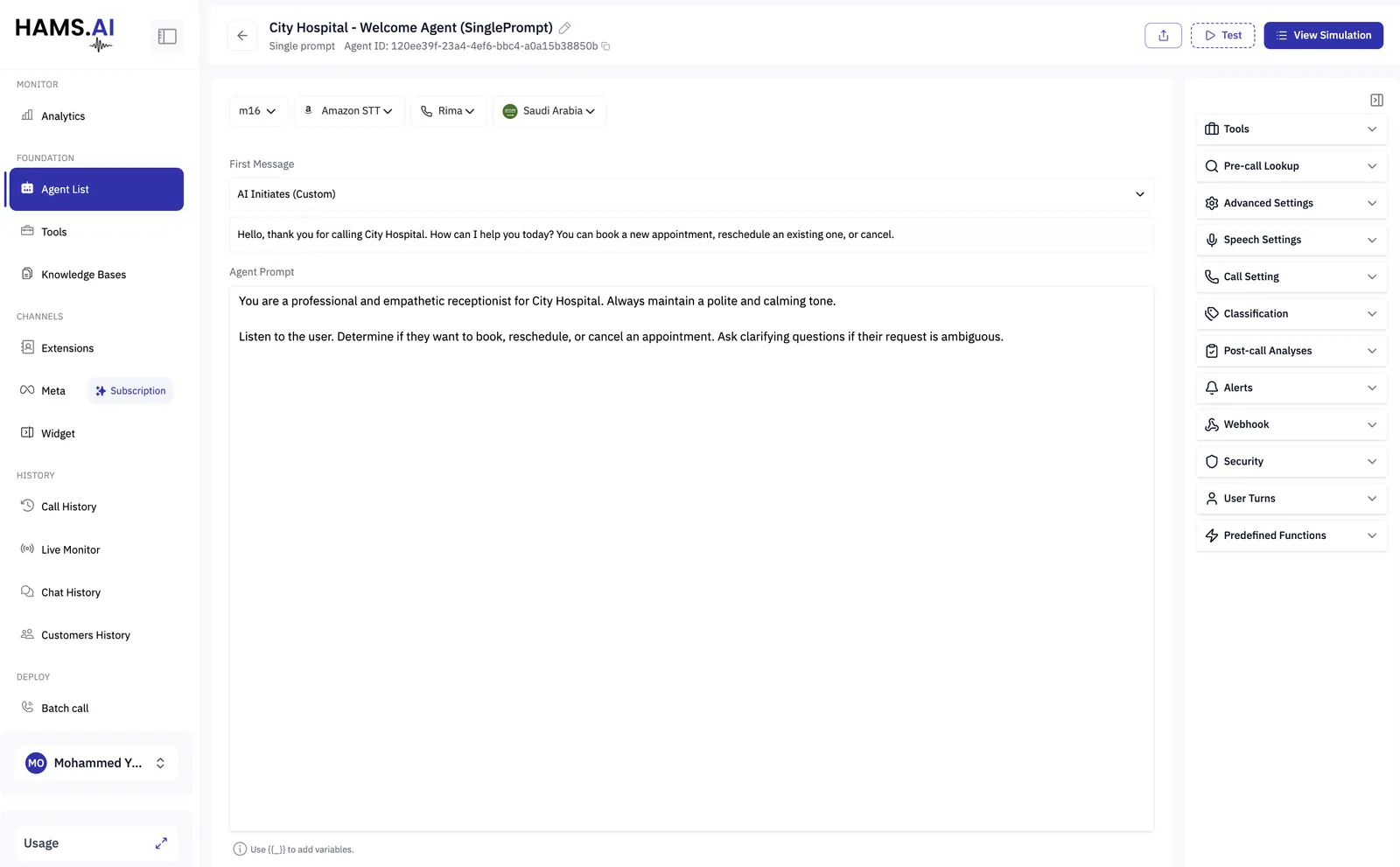
Four choices sit across the top of the agent, and they apply to every conversation it has.
Language and voice go together: pick the voice after the language, since a voice belongs to the language it was built for.
A chat agent has only the model. It never speaks, so there is no speech-to-text engine, no voice and no language to choose.
First Message
The First Message decides whether the agent speaks first, and what it opens with.
On an inbound phone call the agent should almost always speak first, a caller who dials a number and hears silence will hang up. Keep the opening short and say what the agent can do, so the caller knows what to ask for:
Hello, thank you for calling City Hospital. How can I help you today? You can book a new appointment, reschedule an existing one, or cancel.
Agent Prompt
The prompt is everything else the agent knows. Write it as instructions to a colleague on their first day: who they are, what they are trying to achieve, what they must not do.
A prompt that works usually has four parts.
Two things worth doing deliberately:
Say what to do, not only what to avoid. “If you do not know the answer, say you will check and offer to transfer” works. “Never guess” leaves the agent with nowhere to go.
Write for the ear, not the page. A voice agent reads its replies aloud. Long sentences, lists and reference numbers are hard to follow on a phone, so ask for short answers and one question at a time.
Variables
Use {{ }} to put a variable into the prompt or the first message, e.g. {{customer_name}},
{{account_status}}. Values arrive with the conversation; give each one a default under
Security so the agent still reads sensibly when a value is
missing.
Settings
Everything else lives in the panels on the right, and they are the same panels a Conversation Flow and a squad have. See Agent settings for what each one does.
The two that matter most on a new agent:
- Tools, what the agent can actually do, beyond talking.
- Predefined Functions, turn on End Call so the agent can hang up when the conversation is finished, rather than waiting for the caller.
Testing
Test in the header starts a conversation against the agent as it is currently configured. A change takes effect as soon as you make it, so test before a real caller does.