

Conversation Flow
A Conversation Flow agent is a graph you draw. Each step is a node, the connections between them are transitions, and you decide what makes the conversation move on.
Use it when the steps matter, verifying identity before disclosing anything, taking a booking, following a compliance script. A Single Prompt agent will usually get through the same conversation, but it cannot promise the order.
Unlike a Single Prompt agent, a Conversation Flow always starts from blank. There are no templates.
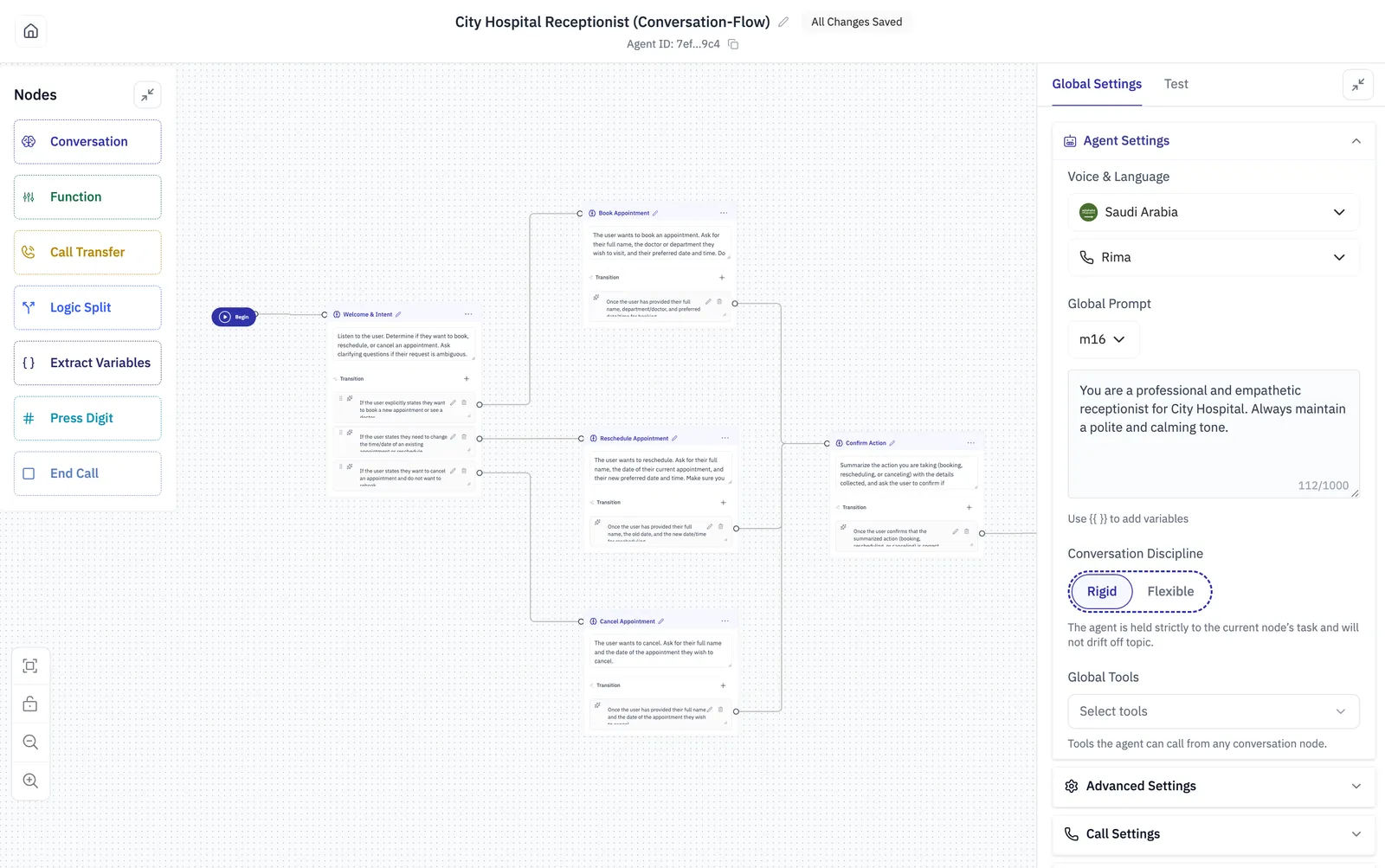
Every flow starts at Begin, which connects to the first node. The header shows the agent name, its ID, and whether your changes are saved, as a flow saves as you work, so there is no save button.
Global settings
These apply to the whole flow rather than to one node.
Global Settings also holds the same Advanced Settings, Call Settings and other panels a Single Prompt agent has.
Rigid or Flexible
Rigid is the reason to build a flow at all. Choose Flexible only when you want the structure as a guide rather than a rule, for example a flow that covers the common path but should still cope with a caller who jumps ahead.
Nodes
Drag a node from the palette onto the canvas, then select it to open Node Settings on the right. Seven kinds are available on a voice agent, and each one is colour-coded on the canvas.
A chat flow has five: Call Transfer and Press Digit both need a phone line, so they are not offered. Everything else behaves the same.
Conversation
The node that talks, and the one most of a flow is made of. Use it for every step where the agent needs to say something or collect something in words.
Use Static Sentence for wording that must not vary, like a disclosure, a legal notice, a confirmation number. Use Prompt everywhere else.
Global Node is how you handle what a caller can say at any point: “start over”, “speak to a human”, “what are your opening hours”. Rather than drawing an edge from every node, make the handling node global and any node can reach it.
Turn on Block Interruptions where being cut off would lose something, like reading back a booking reference. Leave it off in normal conversation, where interrupting is natural.
Function
Calls one of your tools. Use it when the flow needs data from your systems, or needs to write something back, at a definite point rather than whenever the model decides.
Turn Wait for Result on whenever a later node uses what the tool returned. With it off the flow moves on immediately, and the result may not have arrived when the next node needs it. Leave it off only for fire-and-forget calls, such as logging.
Turn on Speak During Execution for anything slow. Several seconds of silence on a phone call reads as a dropped line.
Call Transfer
Hands the call to a person.
The node’s only transition is Transfer failed. Connect it, or a caller whose transfer does not connect is left with an agent that has nothing to do next.
Fill in Escalation reason even though it is optional. It is what tells you afterwards why calls are being handed over, and it costs one line.
Logic Split
Branches on values you already hold, rather than on the model’s judgement. Use it after an Extract Variables or Function node, when the next step follows from a fact rather than from what the caller meant.
Each branch is a set of comparisons combined with AND or OR. Branches are evaluated in order, the first branch whose conditions hold is taken, and Else catches everything that matches nothing. Each branch can pause before it transitions.
Always connect Else. It is the branch that catches the values you did not anticipate.
Extract Variables
Collects named values out of what the caller has said, so later nodes can use them. Use it whenever you need a specific fact, like a booking reference, a date, a yes or no, rather than a general understanding.
Each variable has a name, a type and a description. The description is what tells the model which
part of the conversation to take the value from, so make it specific: “the date the caller wants to
move the appointment to, not the date of the existing one”. Refer to a variable elsewhere with
{{name}}.
Press Digit
Sends keypad tones down the line.
Press Digit sends tones, it does not collect them. Use it when your agent has called a system that answers with its own phone menu and has to navigate it. To collect a digit from a caller, use a Conversation node and extract what they said.
Raise the delay if the system on the other end misses digits, as some older menus need 300 ms or more between tones.
End Call
Ends the conversation. It has no settings of its own.
Transitions
A transition is how a conversation leaves a node, and there are two kinds. Choosing between them is the main thing that makes a flow reliable.
Described in words. On a Conversation node you write the condition in plain language, like “Once the user has provided their full name, department and preferred date and time”. The model judges when it has been met. A transition can also carry a delay, and extract variables as it fires.
Compared as values. A Logic Split takes the first branch whose comparisons hold. No judgement is involved, and the same inputs always take the same branch.
Prefer a Logic Split whenever the decision can be made from a value you already hold. Words are for judging what the caller meant; comparisons are for facts you have collected. A flow that branches on words where it could branch on values is a flow that will surprise you.
Where a node has several worded transitions they are judged together, so make them mutually exclusive. Two conditions that could both be true at once give you a branch you cannot predict.
Testing
The Test tab beside Global Settings starts a call with the agent as it is currently configured, without publishing anything, so you can hear a change before it reaches a caller.
Node Settings has its own Test tab, so you can exercise one node without walking the whole flow to reach it, useful for a branch that is hard to arrive at legitimately.